Showing posts with label tutorial. Show all posts

Monday, 26 December 2011

Visual Basic .net enter key on textbox


If you ever wanted to capture the key Enter on a text box, here is the code

Private Sub txtsearch_KeyPress(ByVal sender As Object, ByVal e As System.Windows.Forms.KeyPressEventArgs) Handles txtsearch.KeyPress
   If Asc(e.KeyChar) = 13 Then
   'Your code goes here...
   End If
End Sub
The best method i found is to create a sub process and call it from both of your codes. Both codes i mean the button that you press the Enter key and the button that you have to handle the user input

Tuesday, 27 October 2009

How to get system uptime in windows XP

Windows XP Professional just type systeminfo in a cmd window
Windows XP Home you have to download this program from here and copy it to windows /system 32 i think

remember this program is a command line program and will vanish if you dont open it from a new cmd window

Sunday, 4 October 2009

jQuery Sliding / Toggle Effect on Divs


Watch this video to learn how you can make your website slide content on the press of link just like facebook

How to do a Javascript AJAX loader with jQUERY


Very nice video on how to use the jquery in your website
saves you time and money

Monday, 31 August 2009

Javascript code for the status bar

In the status bar of the browser you can set a text the time or what ever its up to you.
If you complete this `tutorial` and you still dont see the status bar message 
go to enable-javascript-to-change-status-bar
how to use this feature
Create a new html file create a new script area (javascript) and create a function
i will name my function startScript()
the code for changing the status message is window.status = text

<html>
  <head>
    <title>
      http://cycomptech.blogspot.com/
    </title>
    <script type="text/javascript">
      function startScript()
      {
        var stavros = "This is a test!";
        window.status = stavros;
      }
    </script>
  </head>
  <body onload="startScript();">
    <center>
      This page demonstrate the status bar of the browser<br>
      using javascript<br>
      <a href="http://cycomptech.blogspot.com/">http://cycomptech.blogspot.com/</a>
    </center>
  </body>
</html>

Saturday, 29 August 2009

Smart Device part 4

View the data

Smart Device Part 3

During the last weeks we made our GUI we create our form to insert records in our database now we must make our program to check if the database exist and if no to create it in the same directory.
First of all add reference System.Data.SqlServerCe 

Smart Device Part 2

At part 1 we specify what the program will do and we create the SQL statement that will create the database, now we will start building our GUI.

Smart Device Part 1

We will start our application that will connect a smart device program to a database.
The program when it will start will search in the application directory if the database exists if not will create the database.
The connection will be accomplished with code....
During the development of the program I will take screen shots.
What the program will do:
The program will accept new customers and display them in a list the user will be able to select the customer and update all information about the customer.
It's simple.
Now what we need to create our database
Step one: Design the database

Id
Name
Surname
Address
Telephone
Type
Number Primary key
String
String
String
Number
Sql compact type
Int primary key
Nvarchar
Nvarchar
Nvarchar
int

Friday, 28 August 2009

VB Net Smart Device Tutorials

Php tutorials are paused temporally and soon i will start vb net smart device tutorials on how to handle databases

i will start because a friend of mine ask me to post.....

For the tutorials i will use Visual studio 2008 professional

Visual studio express does not include Smart device development

Php Tutorial Part 7

Arrays

We talk about what variables are in previus tutorial today we will learn what an array is and what we can do with it.

Php Tutorial Part 6

PHP switch statement

Php Tutorial Part 5


Conditional Statements


The IF Statement (most used in all programming languages)

Syntax:
if (condition)
{
//Code to be executed
}
elseif (Condition)
{

}
else
{

}

Example:
<html>
<body>

<?php
$number=15;
if ($number ==15)
{
echo "The number is 15";
}
elseif ($number >16)
{
echo "The number is greater than 16";
}
?>

</body>
</html>

The if statement is the most used Conditional statement, in php the condition must be surrounded by ( ) if you will execute 1 line of code you don’t have to surround the code with { } but I strongly suggest that you always surround the code with { }.

Php Tutorial Part 4

Operations

Arithmetic Operators
Operator Description Example Result
+ Addition x=2
x+2
4
- Subtraction x=2
5-x
3
* Multiplication x=4
x*5
20
/ Division 15/5
5/2
3
2.5
% Modulus (division remainder) 5%2
10%8
10%2
1
2
0
++ Increment x=5
x++
x=6
-- Decrement x=5
x--
x=4
Assignment Operators
Operator Example Is The Same As
= x=y x=y
+= x+=y x=x+y
-= x-=y x=x-y
*= x*=y x=x*y
/= x/=y x=x/y
.= x.=y x=x.y
%= x%=y x=x%y
Comparison Operators
Operator Description Example
== is equal to 5==8 returns false
!= is not equal 5!=8 returns true
> is greater than 5>8 returns false
< is less than 5<8>
>= is greater than or equal to 5>=8 returns false
<= is less than or equal to 5<=8 returns true
Logical Operators
Operator Description Example
&& and x=6
y=3(x <> 1) returns true
|| or x=6
y=3(x==5 || y==5) returns false
! not x=6
y=3!(x==y) returns true
Operations are very useful, so learn them you will use them later.

Php Tutorial Part 3

Variables Continue:
You can have very useful functions with variables.
For example:
$var1 = "Welcome";
$var2 = " to my website";
echo $var1 . $var2;
?>
The above code will output in one line Welcome to my website (They words are not connected why? Because in the $var2 the beginning starts with space if it was not a space character there the programmer should do this echo $var1 . " " . $var2; This will print an extra space between the two characters.
While i was designing a php website someone ask how do i find out what is the length of a variable in phpThe answer is simple and is provided for you in php with the function strlen() The use is:
$var1 = "Welcome to Cyprus have a Nice day";
//call a function to show how many characters are in a varialbe
echo strlen($var1);
//The output should be: 33
?>
In php they are many functions that will help you with your string variables we will refer to them later in the tutorials

Php Tutorial Part 2

Variables: Variables are very usefull part of a programming language. They can store temporary information for useful functions like calculations.
Remember that the code must be surounded by: variables must have $ (dollar) at the beginning of the variable

$var1 = "Stavros";
echo $var1;
?>
This code will output to the user "Stavros".
variables as I said above are very useful and because php is a loosely Typed Language you don't have to tell to the php engine what type of data you will save in the variable, php engine will work out what type of data you have save. In php you don't have to initialise your variables.


$a = 1;
$b = 4;
$c = $a + b;
echo $c;
?>
The output of the above code is: 5
More about variables:
They have restrictions and you can get very strange messages if you do not follow the rules for declaring them.
Variables must begin with $ followed by letter or _ (underscore) They cannot start with number like $1test this is wrong and you will get error.
Variables can contain numbers like $test1. You cannot have variables that have space inside php will return error, if you have a big word for variable do it like this $colour_of_dog or $ColourOfDog Both are correct.
To set a value to a variable use = NOT == because it means equal with something
Tip: to create good websites you need to know HTML, most websites are combination of html and php, you will use php without html tags only for calculations, validating users etc...

Php Tutorial Part 1

This is the first part of the php script language tutorial.

Basic: you need a webserver that support php and mysql
They are many free hosting providers but for experimenting i suggest that you install on your computer wamp.

When you install wamp or create an account with a free hosting provider

open a new document in the www directory in c:\wamp and name it index.php
paste the code below
<html>
<body>

<?php
echo "Hello World";
?>

</body>
</html>

ok what the above code does?
<html> are html tags

between <?php ?> are php script tags

echo "Prints something to the screen";

it can be done like this echo "hello";

or echo "hi
this is a test message";

Ok how we insert comments ?

comments are inserted like this
//single line comment

/*

This is a

multi line code

*/

Remember the code must be surrounded by <?php ?>
or it will be showed to the users browsers

This is the fist tutorial and is very simple.

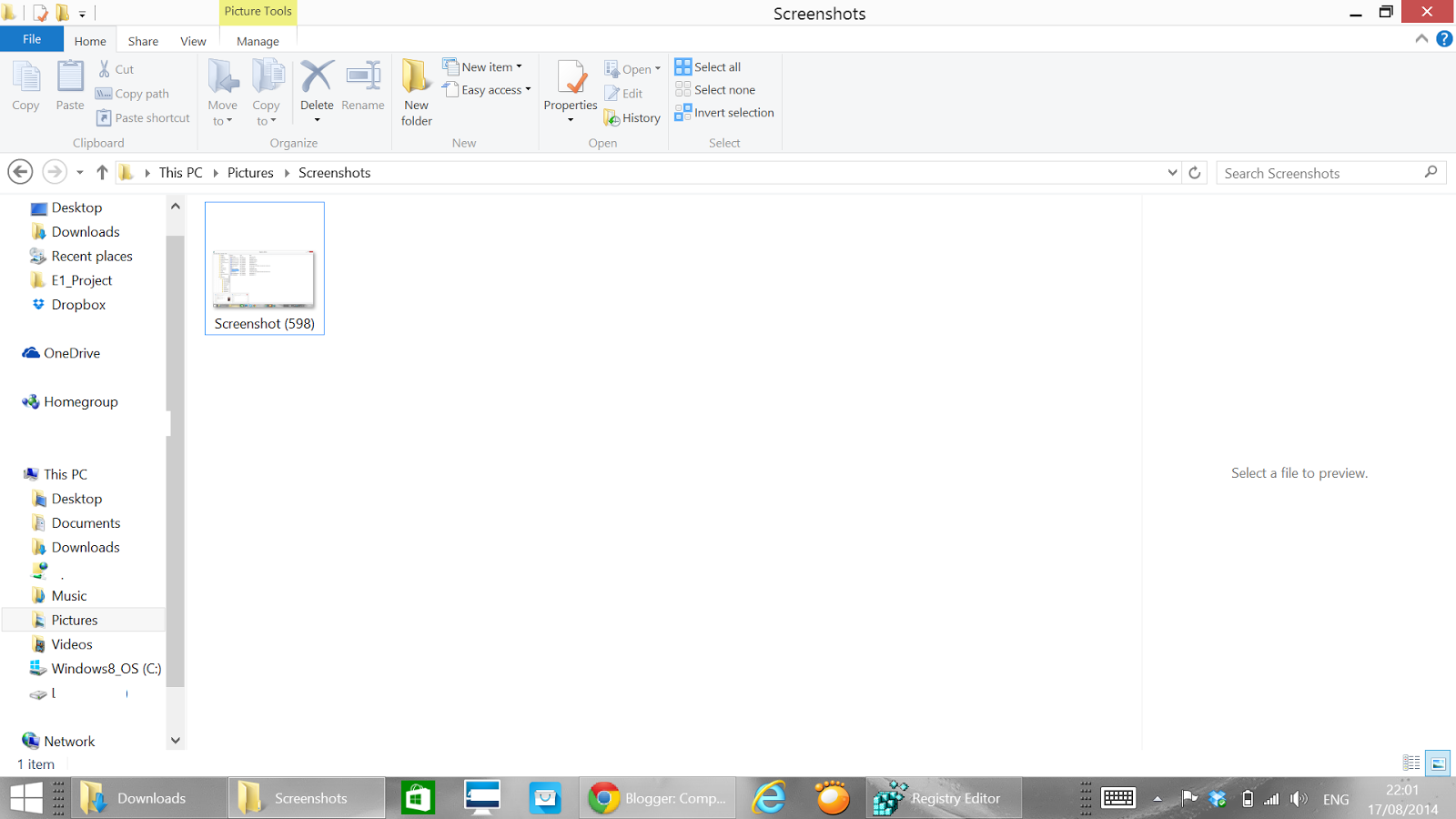
Reset numbering for Screenshots Win+PrtSc

I was using today the screen shot functionality of Windows 8.1 Win Key + PrtSc How to reset the numbering?